


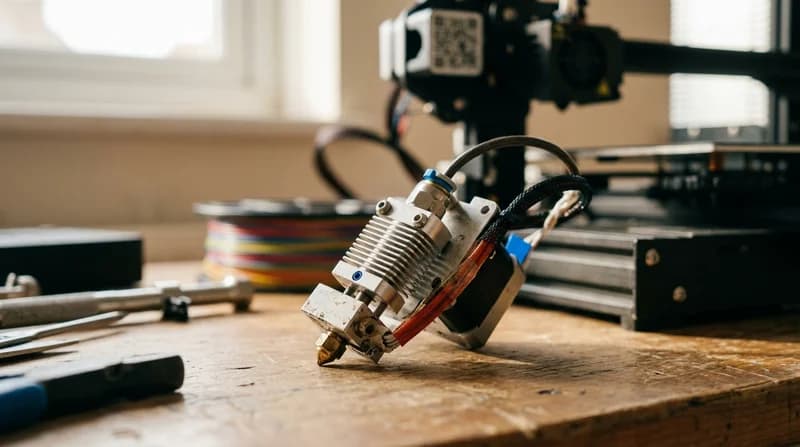

Choose 3D printer parts by the print problem you can see
When a print goes wrong, the surface usually tells the story. Fine strings, rough walls, skipped layers, grinding sounds, or soft corners often point to one weak point in the machine. This collection helps you compare 3D printer parts for better print quality by visible result first, as that is how real troubleshooting works at the bench.
On the Chinese marketplace, many shoppers search by part name alone and still end up with the wrong fix. A nozzle may look worn, yet the real issue could be feeding drag, unstable heat, or loose motion. That is why this category brings hot end parts, extruder pieces, tubes, fittings, belts, rollers, boards, and sensors into one place.
If your printer has started acting differently after weeks of good results, ask yourself one thing. What changed in the sound, feel, or finish of the print?
What to choose for smoother extrusion and cleaner layers
Uneven lines, thin patches, clicking extruders, and random under extrusion usually come from resistance in the filament path. That can start at the nozzle, continue through the tube, or build inside the hot zone. If you are comparing replacement 3D printer parts for clogged nozzle problems, start with the full path rather than one tiny component, as partial blockages often return when the rest of the path stays rough.
Look at these part types first
- Nozzles for sharper flow control, as worn tips can widen lines and blur detail
- PTFE tubes and fittings for smoother feeding, as poor tubing adds drag and heat damage
- Extruder gears and tension parts for steadier grip, as weak bite leads to slipping
- Hot end assemblies for stable melting, as heat creep can soften filament too early
- Cooling fans for cleaner bridges, as controlled airflow helps layers set faster
If you want 3D printer upgrade parts for smoother extrusion, choose matched components rather than one aggressive upgrade. A stronger extruder feels exciting, yet it will not stay smooth, as weak cooling or poor tubing can still choke the path. On AliExpress, that full system view often saves more time than replacing the same nozzle again and again.
For nearby workshop essentials, you can also explore Tools, Soldering Kits, and Multimeters when wiring, testing, or fitting replacement parts.
Fix ringing, layer shifts, and wobble with motion parts
If walls look echoed, corners ripple, or layers shift halfway through a long build, the motion system deserves a close look. These faults often feel mechanical. You may hear a harsher travel sound, notice a looser carriage, or feel uneven resistance when moving an axis by hand. That points toward 3D printer belts rollers and motion parts, as print quality depends on controlled movement as much as heat.
Motion parts that often restore accuracy
- Belts for tighter positioning, as stretched teeth can blur corners and circles
- Rollers and bearings for smoother travel, as worn contact points create vibration
- Pulleys and idlers for cleaner tracking, as misalignment can pull motion off line
- Stepper related fittings and mounts for stability, as tiny shifts can grow across tall prints
Good motion parts do more than improve appearance. They also make the printer feel calmer in use, as reduced chatter and cleaner travel lower stress during long jobs. The platform becomes easier to trust when every pass sounds more even and every layer lands where your slicer intended.
If you are building a more capable workspace around your machine, Electric Screwdrivers, Screwdriver Sets, and Laser Levels can help with setup accuracy and repeatable maintenance.
When heat, sensors, or boards are the real problem
Some print faults look mechanical but start in the electronics. Temperature swings can leave glossy blobs, weak layer bonding, or rough matte patches in the same part. Endstop or probe faults can ruin first layers. Board issues can cause random pauses, odd fan behaviour, or unreliable heating. That is where 3D printer motherboard and sensor replacement parts matter, as stable signals create stable prints.
Signs you may need control or sensing parts
- First layers vary even after repeated levelling
- Temperatures drift or overshoot during long prints
- Fans start late, stop early, or sound inconsistent
- Axes home unreliably or pause without warning
On the marketplace, shoppers often overlook firmware support, connector type, and voltage. That is risky, as two boards can appear nearly identical while behaving very differently once installed. If you are choosing 3D printer spare parts for Ender and Prusa style machines, always compare fit, plug style, and supported features before you decide.
For bench testing and cable management, related categories like Power Tool Accessories and Hand Tools can make installation tidier and safer.
Costly mistakes to avoid when choosing 3D printer parts
The most expensive mistake is not the part itself. It is losing another weekend to the wrong diagnosis. Many shoppers on this global platform replace the first part that looks suspicious, as visible wear is not always the source of the fault.
Avoid these common traps
- Choosing by appearance only, as similar hot ends and boards can differ in size, voltage, and connectors
- Replacing the nozzle first every time, as blobs and gaps may come from cooling or feeding resistance
- Picking the lowest grade wear parts, as soft gears and poor tubing can bring the same issue back fast
- Upgrading one area only, as a hotter hot end still depends on stable motion and airflow
- Ignoring machine style, as parts for Ender and Prusa style machines are not always cross compatible
The smarter route is to trace the symptom through the whole system. Look, listen, and feel. Is the printer clicking, scraping, wobbling, or drifting in temperature? Those clues matter, as they point you toward the real fix rather than the obvious one.
Build a more dependable printer, not just a patched one
The best results come when replacement and upgrade choices work together. Hot end and extruder parts for 3D printers perform better when paired with good cooling, clean filament routing, and stable motion. Nozzles tubes and fittings for filament feeding matter more than many people expect, as tiny friction changes can show up as visible defects across an entire model.
That is why this category sits naturally within the wider tool range of the British site. It is printer specific, precision focused, and built around outcomes you can actually see in the finished part. Cleaner walls. Quieter travel. Stronger layer bonding. More confidence when a ten hour print begins.
If you enjoy technical builds and precision projects, you may also like Electronics, Mechanical Keyboards, and Model Kits for detailed hands on work.
So what should you change first: the nozzle, the extruder, the motion path, or the board? The answer usually hides in the exact flaw your print keeps repeating.