


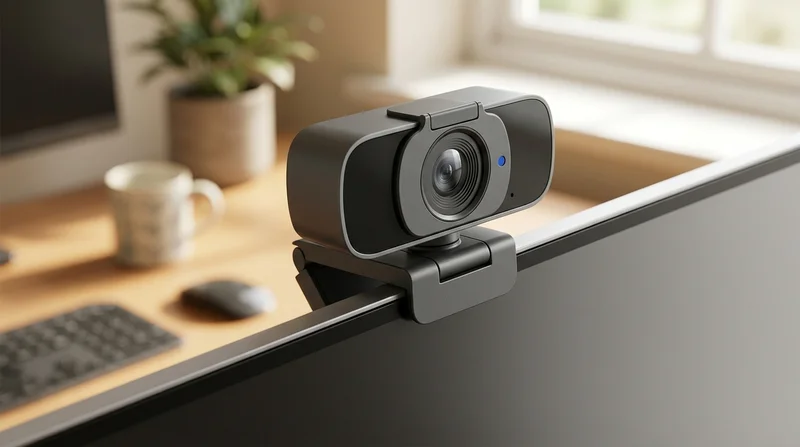

Webcams for clearer meetings, streams, and everyday face to face calls
A weak built in camera can make your face look soft, noisy, and dim. That matters more than many people expect, as first impressions on screen are formed in seconds. A sharper webcam helps you look alert, polished, and easier to trust during work calls, lessons, live chats, and creator sessions.
This category on the marketplace focuses on real desk use in the United Kingdom. That means choosing by how you actually appear and sound on screen, not by one flashy number. If you want the best webcam for streaming and video calls UK, start with the moments you use it for most. The right choice often becomes obvious after that. But which details truly change what people see?
Choose by use case, not by spec noise
For work meetings and daily calls
A webcam with microphone for online meetings suits home desks that need quick, reliable setup. Look for clear 1080p video, steady frame rate, and balanced built in sound, as that mix usually creates a more professional look without extra gear.
If your room light changes through the day, low light handling matters just as much as resolution. Better light correction keeps skin tones warmer and cleaner on screen, as many home offices are lit by windows, lamps, or overhead bulbs rather than studio lights.
For streaming and content creation
An autofocus webcam for streaming setup is useful when you move, gesture, or hold products close to the lens. Focus stays crisp as your distance changes, so viewers keep seeing your eyes, hands, and details clearly instead of a soft blur.
Smoother frame rates also help. Motion looks more fluid and natural, as 30 frames per second can be enough for calls, while faster capture can feel more alive during streaming, gaming chat, and creator clips.
For simple plug in convenience
A plug and play webcam for PC makes sense if you want less setup stress before calls. You connect it, clip it, and get started quickly, as there is less friction between opening your laptop and appearing ready on screen.
If you use a larger display, a USB webcam for desktop monitor can improve angle and eye line. That often makes conversations feel more direct, as the lens sits in a better position than a low laptop camera.
The features that actually change how you look and sound
Resolution and frame rate work together
A full HD webcam for laptop UK shoppers often choose is usually a smart middle ground. It gives a clean, detailed picture without feeling excessive, as 1080p is widely supported for meetings, classes, and everyday streaming.
Still, resolution alone does not guarantee a pleasing image. Frame rate shapes how movement feels, as a sharp picture can still look stiff or choppy if motion handling is weak.
Low light performance shapes confidence
Low light quality affects more than brightness. It changes how smooth your skin looks, how much grain dances across the image, and how awake you appear after a long day, as many rooms are not flooded with ideal daylight.
If evening calls are common, a low light webcam for home office use can make a visible difference. Faces look brighter and calmer, and the whole frame feels less muddy.
Microphone quality affects connection
People often notice rough audio before they notice picture flaws. A webcam with a decent microphone can make your voice sound nearer and easier to follow, as distant or echoing sound quickly drains attention in meetings and streams.
If sound matters heavily for your setup, you may also want to explore Microphones or pair your desk with Over-Ear Headphones for clearer monitoring.
Mounting and privacy matter every day
A webcam should sit securely on your screen and point at a flattering angle. Good mounting fit helps you avoid awkward chin level views, as camera position changes how confident and natural you appear.
A webcam with privacy cover UK shoppers often prefer adds peace of mind between calls. Closing the lens feels simple and reassuring, as your desk stays ready without leaving the camera exposed.
Costly mistakes to avoid before you choose
Choosing resolution alone. A 1080p webcam can still look jerky, as frame rate affects how smooth your gestures and expressions appear.
Ignoring low light performance. Many home rooms are dimmer than expected, as standard lamps and cloudy daylight can create grain, flat colour, and tired looking skin tones.
Assuming every built in microphone is enough. Calls can sound hollow or weak, as room echo and distance from the lens change how your voice reaches others.
Forgetting monitor fit and angle. A poor clip or awkward height can make eye contact feel off, as the camera may point up or down instead of straight ahead.
Skipping privacy features. An uncovered lens can feel intrusive between meetings, as many people want a quick physical way to close the camera after use.
These mistakes are easy to make on the Chinese marketplace, especially when listings spotlight one headline spec. The better route is to match the webcam to your room, your screen, and your daily routine. One more detail can shape results even more than people expect.
Build a desk setup that helps your webcam perform better
Even a strong webcam looks better with the right surroundings. Soft front lighting can brighten your face and reduce harsh shadows, as the lens has more clean light to work with. For that, browse Ring Lights or a focused Desk Lamps option.
If you record, stream, or join long meetings, support gear can make your whole setup feel calmer. A stable stand for notes or a second screen can reduce fidgeting and help eye line, as comfort often improves on screen presence. You can also compare Selfie Sticks and Tripods for flexible placement and Portable Monitors for a cleaner desk workflow.
For a fuller creator or remote work setup on AliExpress UK, many people also pair webcams with USB Hubs, Phone Stands, or Projectors for presentations and hybrid spaces.
Webcams compared with nearby categories
Webcams are built for live face to face computer video. They are different from Security Cameras, which watch spaces continuously rather than flattering your face during a call.
They are also different from Phone Lenses, which change mobile shooting style, and from lights or tripods, which support image quality without capturing direct desktop video themselves. If your goal is to look clearer in Zoom, Teams, streaming software, or live chat, a dedicated webcam is the direct answer, as it is designed for that exact job.
How to choose your best match
Start with your main use. Meetings usually need clean 1080p, decent sound, and easy mounting. Streaming often benefits from autofocus, better motion handling, and stronger low light control, as viewers notice movement and detail more closely.
Then check your room. If you work in softer evening light, prioritise low light quality. If privacy matters, choose a model with a cover. If you want fast setup, go for a plug and play webcam for PC use. On the platform, those simple filters can narrow the field quickly and lead you to a webcam that feels right the moment the call begins.